Parqet Terminal Review 2026: The New Stock Research Tool in Detail
Parqet has launched Terminal, a standalone research tool for stock analysis. In my review I walk through every feature – the screener with AI search, the stock detail pages, watchlists and portfolio import – plus pricing, the waitlist, who it's for and how it stacks up against expensive analysis terminals. With real screenshots from the tool.
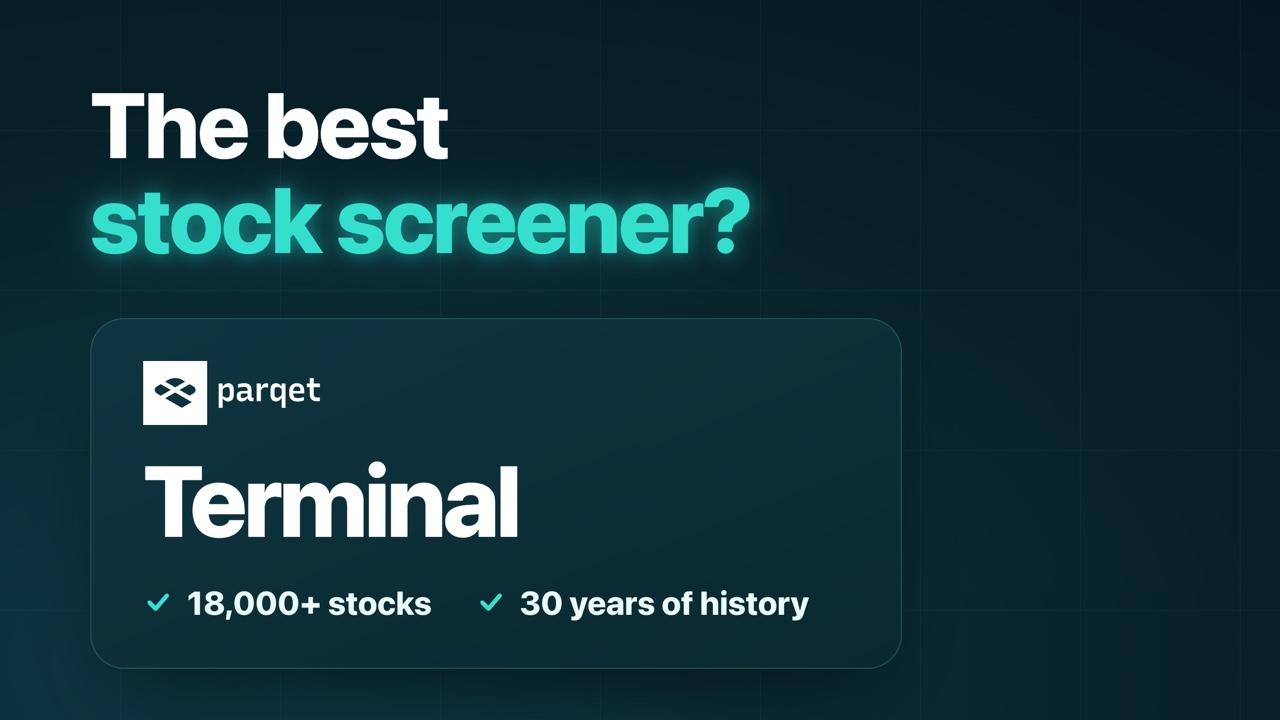
Table of contents
- What is Parqet Terminal?
- Terminal vs. portfolio tracker: what's the difference?
- Video
- The five modules of Parqet Terminal
- The screener: the heart of Parqet Terminal
- The stock detail page: this is where the depth is
- Watchlists and portfolio import
- A perfect match: the Parqet portfolio tracker (15% off)
- Settings, languages and shortcuts
- How much does Parqet Terminal cost?
- Context: what do other analysis terminals cost?
- Who is Parqet Terminal for?
- Is the Terminal worth it?
- My verdict on Parqet Terminal
- FAQ
Most people know Parqet as a portfolio tracker – the app I've used for years to consolidate my entire net worth. Now the team has launched a second, fully standalone product: Parqet Terminal*, a research tool for stock analysis. With it you find, evaluate and analyse individual stocks – with institutional financial data on more than 18,000 companies, a screener with AI search and very deep detail pages. I've taken a close look at the terminal and in this review I'll show you every feature, the pricing and who it's actually worth it for. (As of September 2026)
As always up front: this is not investment advice, just my personal review. And for transparency: the links in this article are partner links – using them supports my work, and the price stays the same for you.
What is Parqet Terminal?
Parqet Terminal is a standalone research tool for stocks from Parqet Fintech GmbH in Hamburg – the same team behind the well-known Parqet portfolio tracker. While the tracker shows what you own and how it's doing, the terminal answers the question before that: which stocks are interesting in the first place – and how deeply can I analyse them?
A few key facts to start:
- Launch: official launch on 11 September 2026, with the screener rolled out in early September
- Data: institutional financial data on more than 18,000 stocks (the screener shows 18,221 unfiltered), with up to 30 years of history and forecasts
- Markets: the US, Canada, the UK and all major European markets (Germany, Austria, Switzerland, France, Italy and more)
- Access: unlocked gradually via a waitlist, then a 5-day free trial
Important to understand: terminal and tracker are two separate products. More on that in a moment.
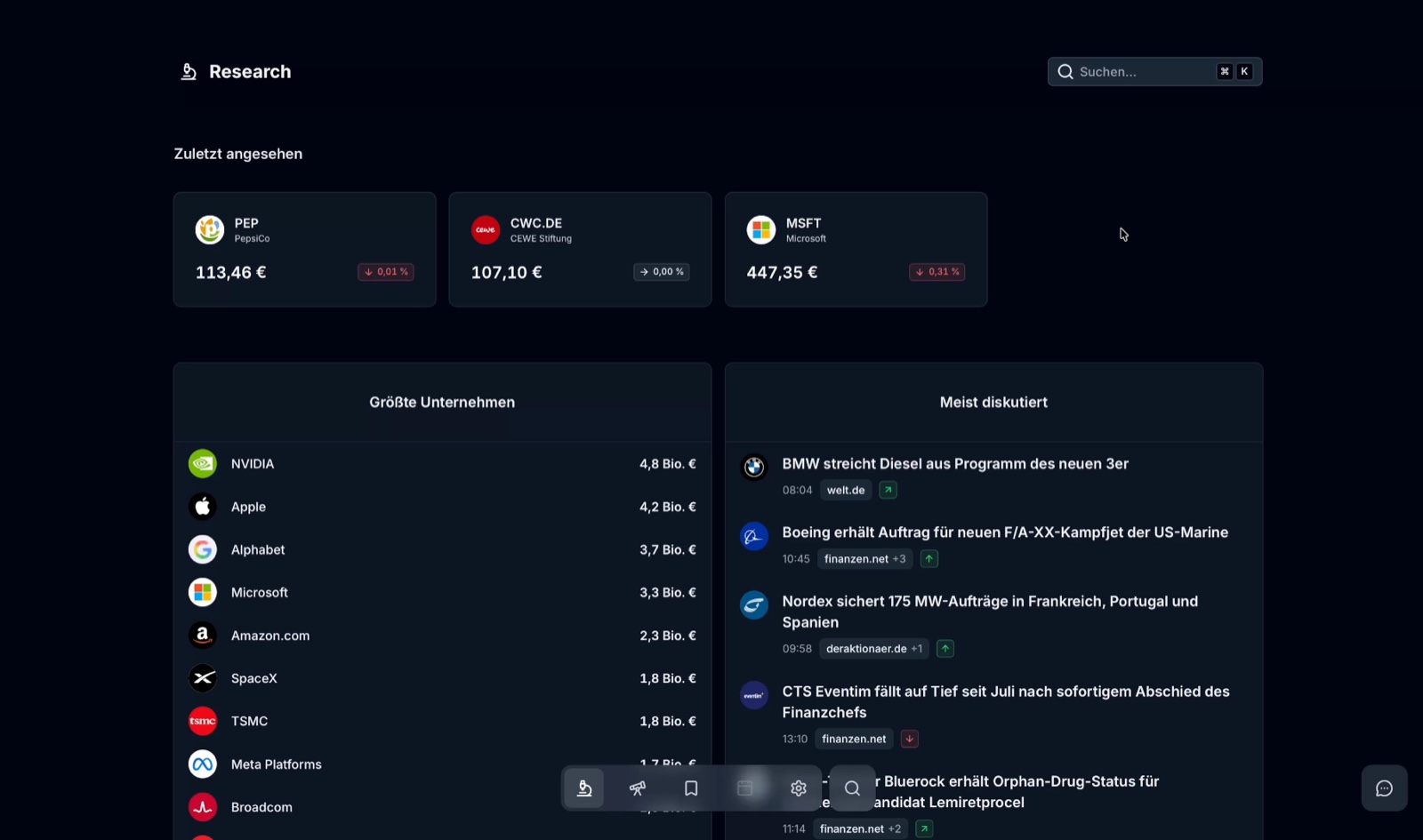
After logging in you always land on the research page. Search up top, below it your recently viewed stocks, the largest companies and the most-discussed news right now – a clean starting point from which you can dive into any single company.
Terminal vs. portfolio tracker: what's the difference?
That's the most common question – and the answer is simple: they're two different tools that you can use separately or together.
| Parqet (tracker) | Parqet Terminal | |
|---|---|---|
| Purpose | track accounts, net worth & returns | find, evaluate, analyse stocks |
| Core question | what do I own and how is it doing? | which stock do I buy next? |
| Heart of it | dashboard across all accounts | screener with AI search |
| Use | standalone | standalone |
So you can use the tracker without the terminal – and the terminal without the tracker. If you have both, they work together: you can import your Parqet portfolios directly into the terminal and analyse them there. How I use the tracker myself is in my separate Parqet review.
Video: Parqet Terminal Review 2026: The New Stock Research Tool in Detail
The full walkthrough of Parqet Terminal is also available as a video – I show you the research page, screener, AI search, the detail pages and the pricing live in the tool. Feel free to watch, or read on below.
The five modules of Parqet Terminal
Parqet builds the terminal around five modules. Three are already usable, two are announced and marked "soon":
| Module | Internal | Status | What for |
|---|---|---|---|
| Research | Understand | ✅ available | metrics, estimates, insiders, filings |
| Watchlist | Watch | ✅ available | earnings, dividends, events |
| Screener | Discover | ✅ available | filters & AI search across the whole database |
| Markets | Context | 🔜 soon | indices, sectors, macro |
| Compare | Compare | 🔜 soon | two companies side by side |
There's also a calendar already in the menu, still locked – an earnings and a dividend calendar are planned. It's not one of the five modules, but a feature I'm already looking forward to.
The screener: the heart of Parqet Terminal
The screener is the tool I always start with – and honestly the strongest part of the whole thing. You reach it with a click or the shortcut G + S. By default you see all 18,221 companies, sorted by market capitalisation.
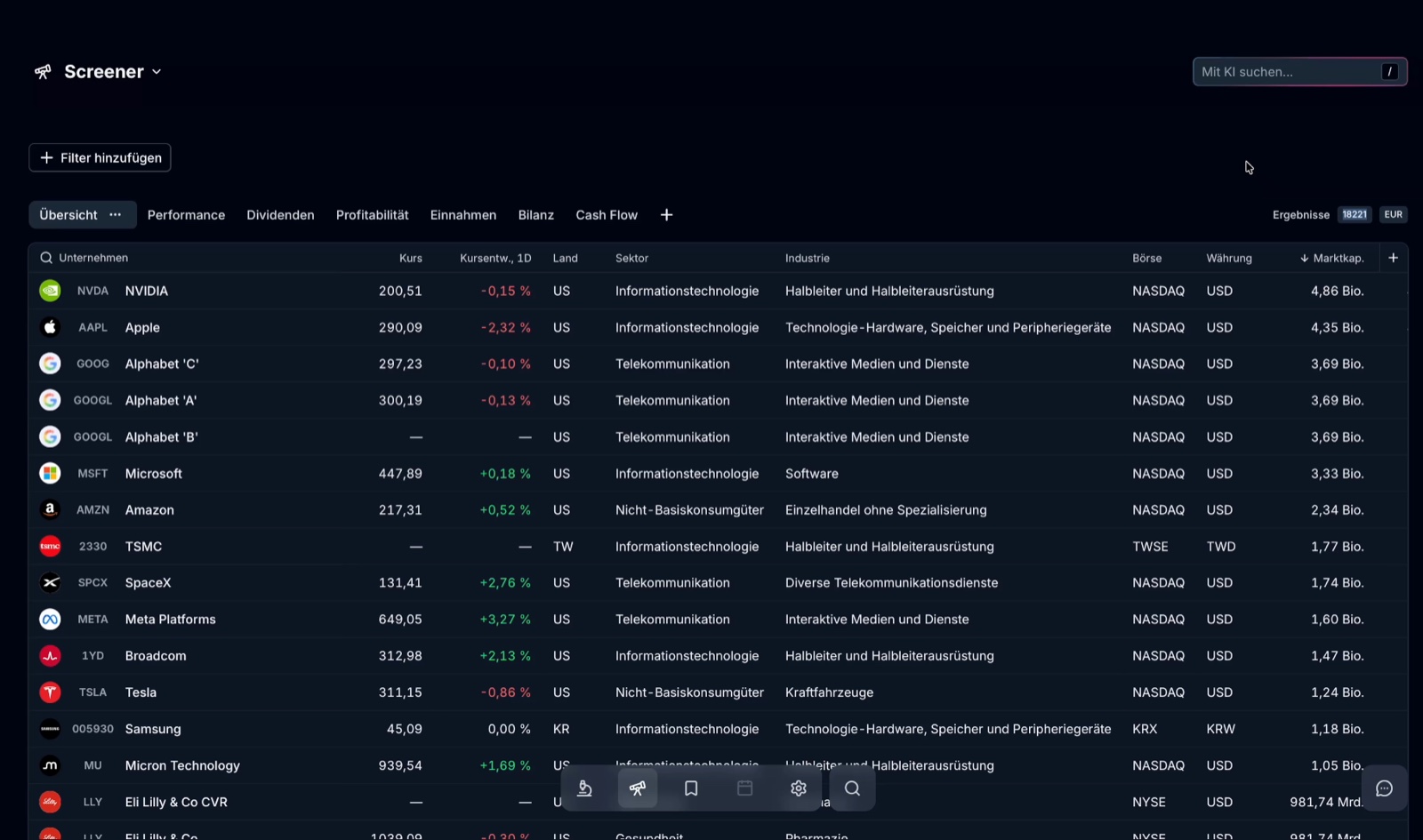
At the top you choose between ready-made views – overview, performance, dividends, profitability, income, balance sheet, cash flow – or build your own column set via the plus. You can start with no columns, use your own set, or tweak a Parqet template.
It gets really powerful with the filters (key F). As a dividend investor, I filter step by step through the huge database, for example:
| Filter | Matches |
|---|---|
| no filter | 18,221 |
| dividend yield ≥ 4% | 2,751 |
| + dividend growth ≥ 5% | 1,039 |
| + growth streak ≥ 10 years | 56 |
| + market cap ≥ €10bn | 14 |
From more than 18,000 titles you're left with 14 interesting candidates in seconds – and it all runs smoothly and fast.
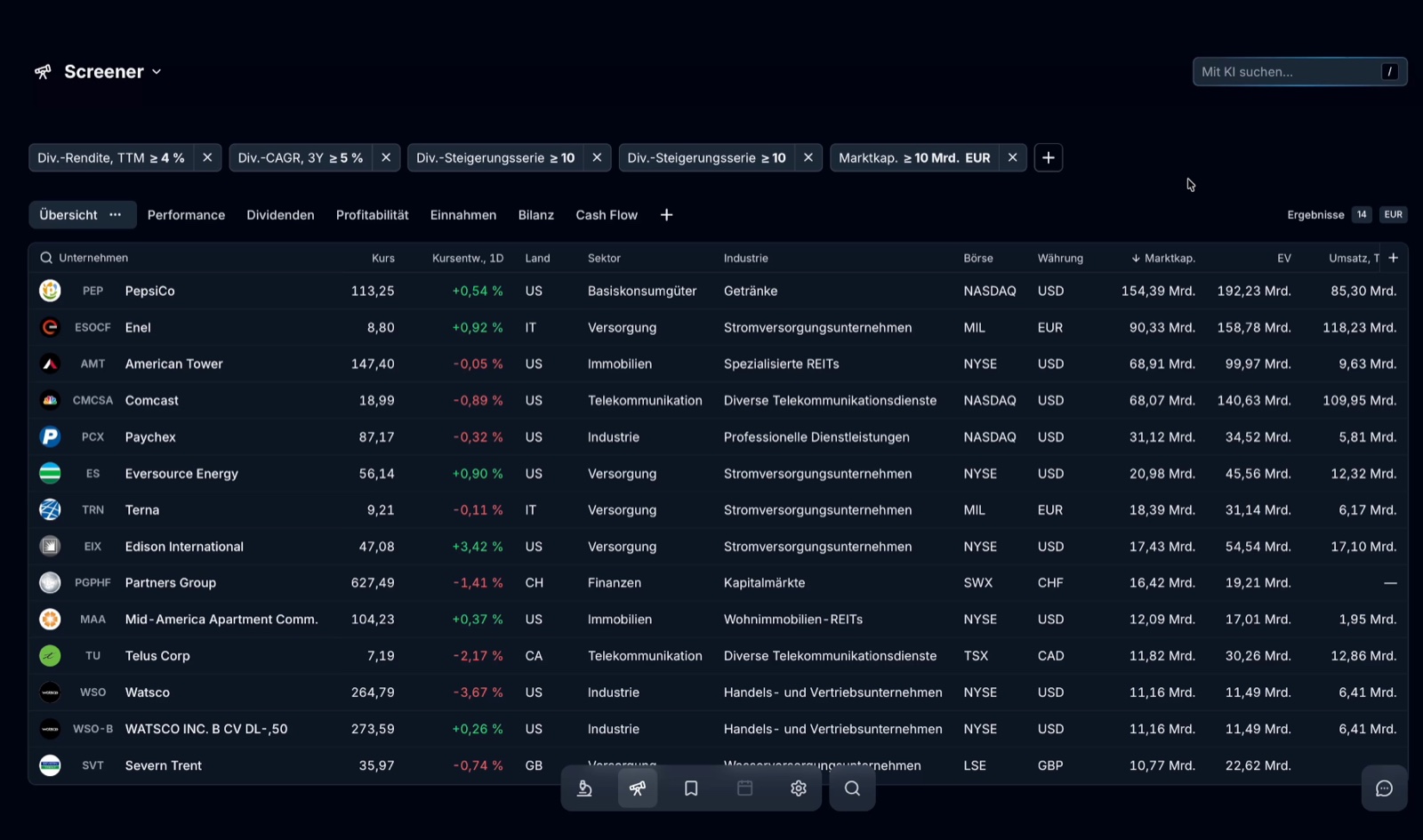
You can save your filter combination as a screen (key N) and even share it via link – handy if you want to compare your criteria with others.
AI search: filters in plain language
The absolute highlight is the AI search. Instead of clicking each filter, you press the slash key (/) and simply describe in words what you're after.
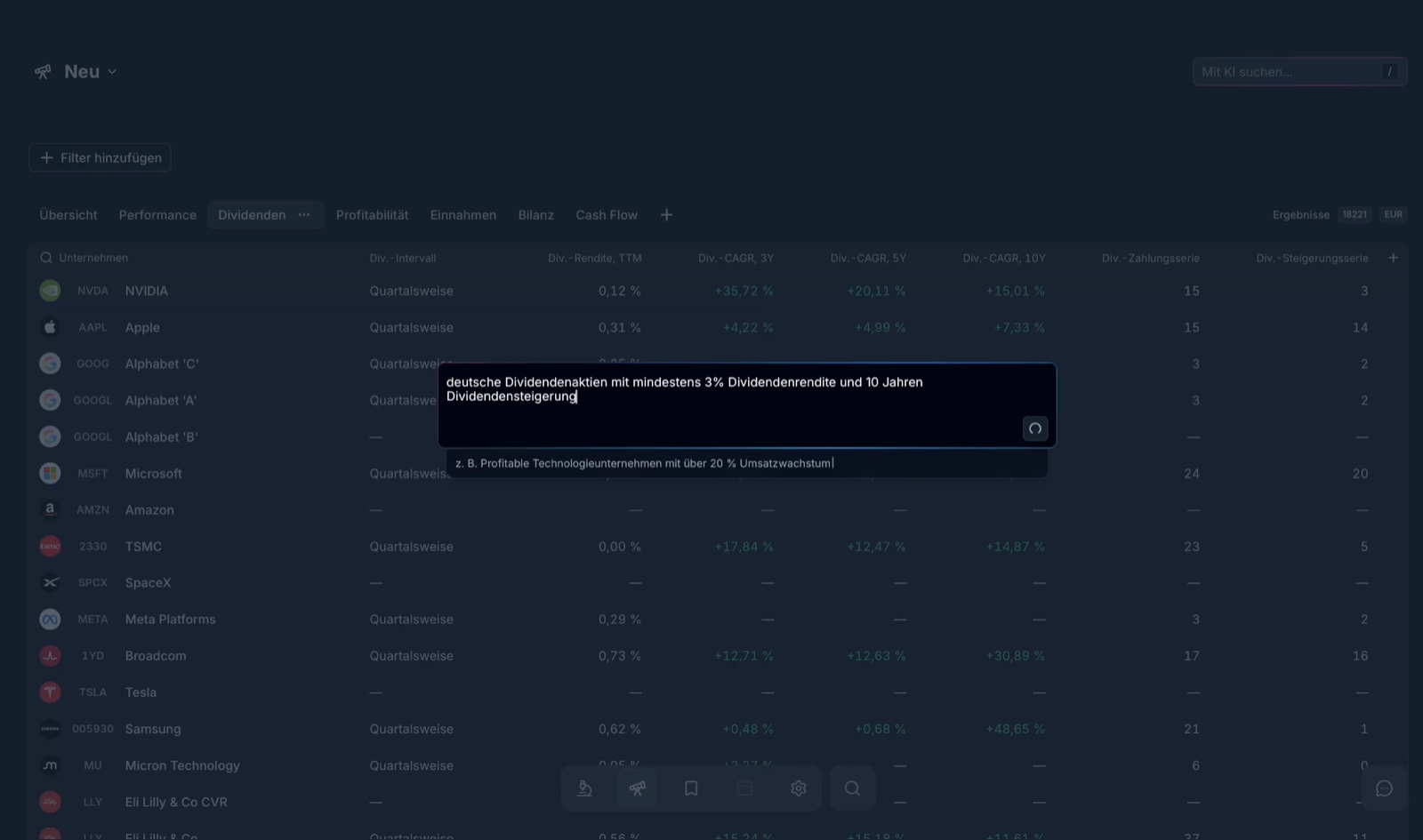
A prompt like "German dividend stocks with at least 3% dividend yield and 10 years of dividend growth" is translated into the right filters automatically – returning matches like Fuchs or Mensch und Maschine. Drop the yield requirement and names like Deutsche Börse, Symrise or CEWE appear too. For quick idea generation this is enormously practical.
The stock detail page: this is where the depth is
Once you've found a candidate, you go to the detail page – and it's impressively packed. Using PepsiCo as an example:
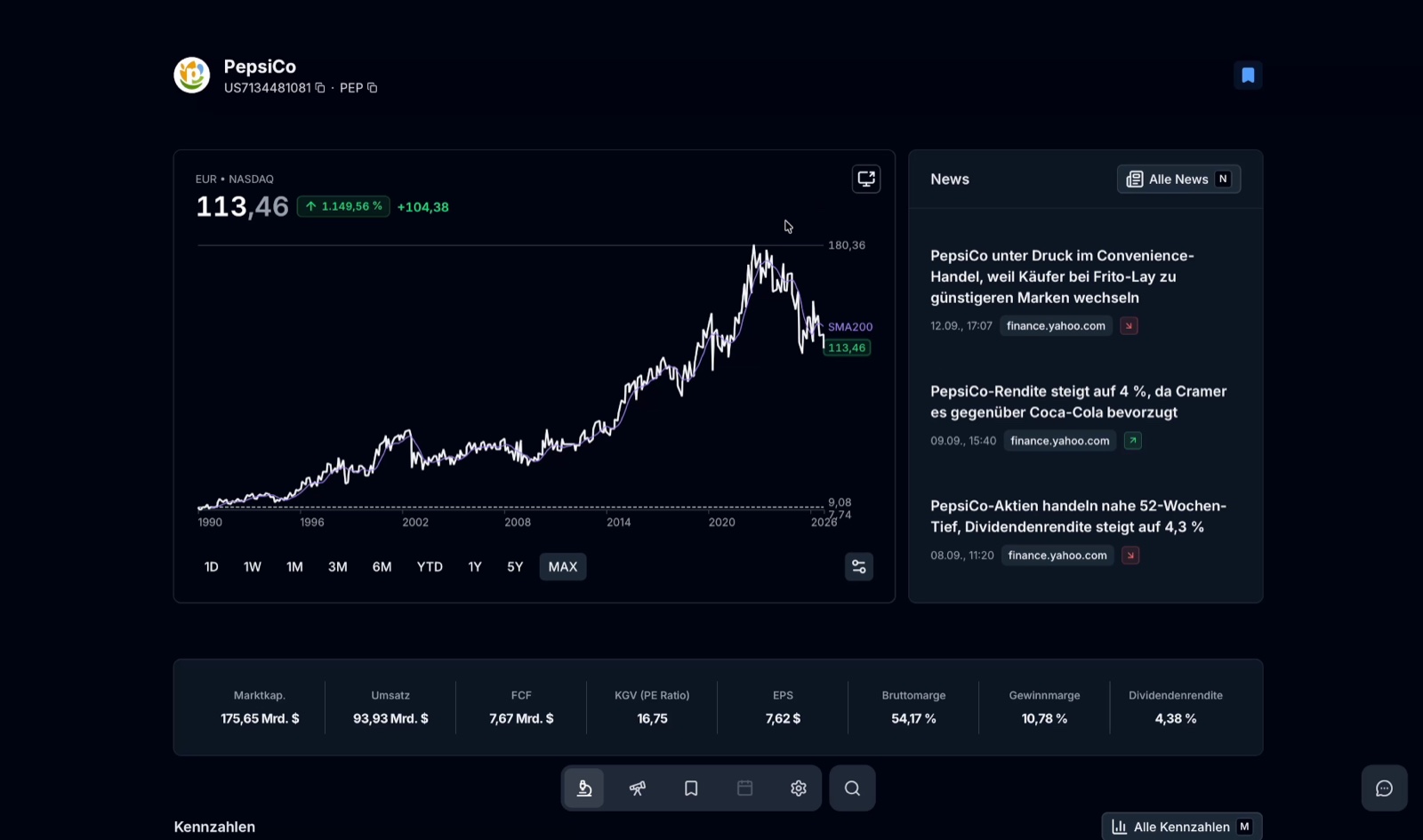
At the top the price chart with ranges from 1 day to MAX and optional moving averages (50/100/200 days), next to it the latest news (key N). Below that the key metrics at a glance: market cap, revenue, free cash flow, P/E 16.75, earnings per share, gross and net margin, and dividend yield. Press M to bring up all metrics – on an annual or quarterly basis – and pin the most important ones to the top.
Peer comparison and valuation
Especially useful is the automatic peer comparison. On the P/E ratio I can see instantly that PepsiCo, at 16.75, is valued far more cheaply than its peer group:
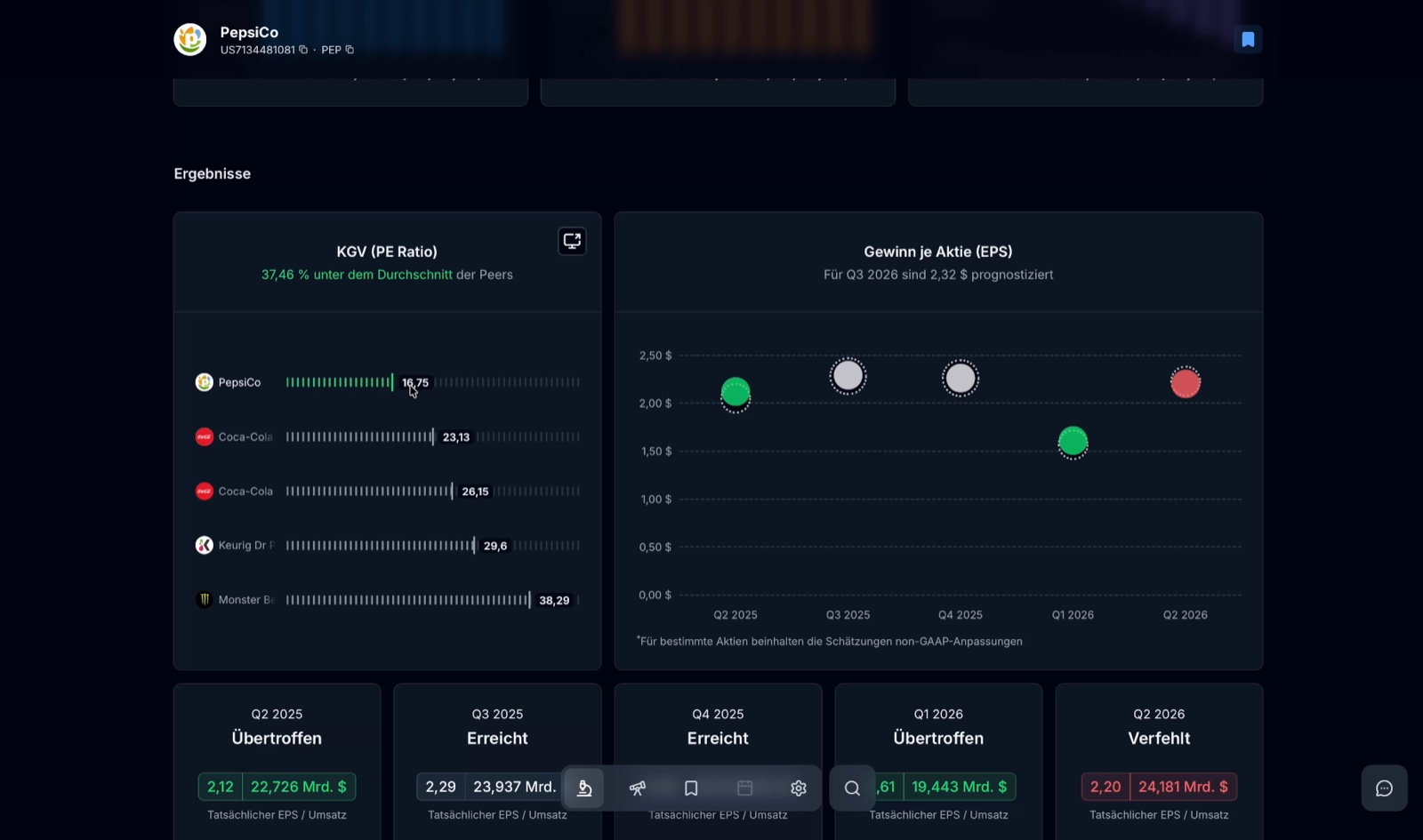
- PepsiCo: 16.75
- Coca-Cola: 23.13
- Coca-Cola HBC: 26.15
- Keurig Dr Pepper: 29.60
- Monster Beverage: 38.29
That's 37.46% below the average of the peers – the kind of context you'd otherwise have to piece together yourself.
Analyst estimates, price targets and insiders
Further down come the analyst ratings and price targets:
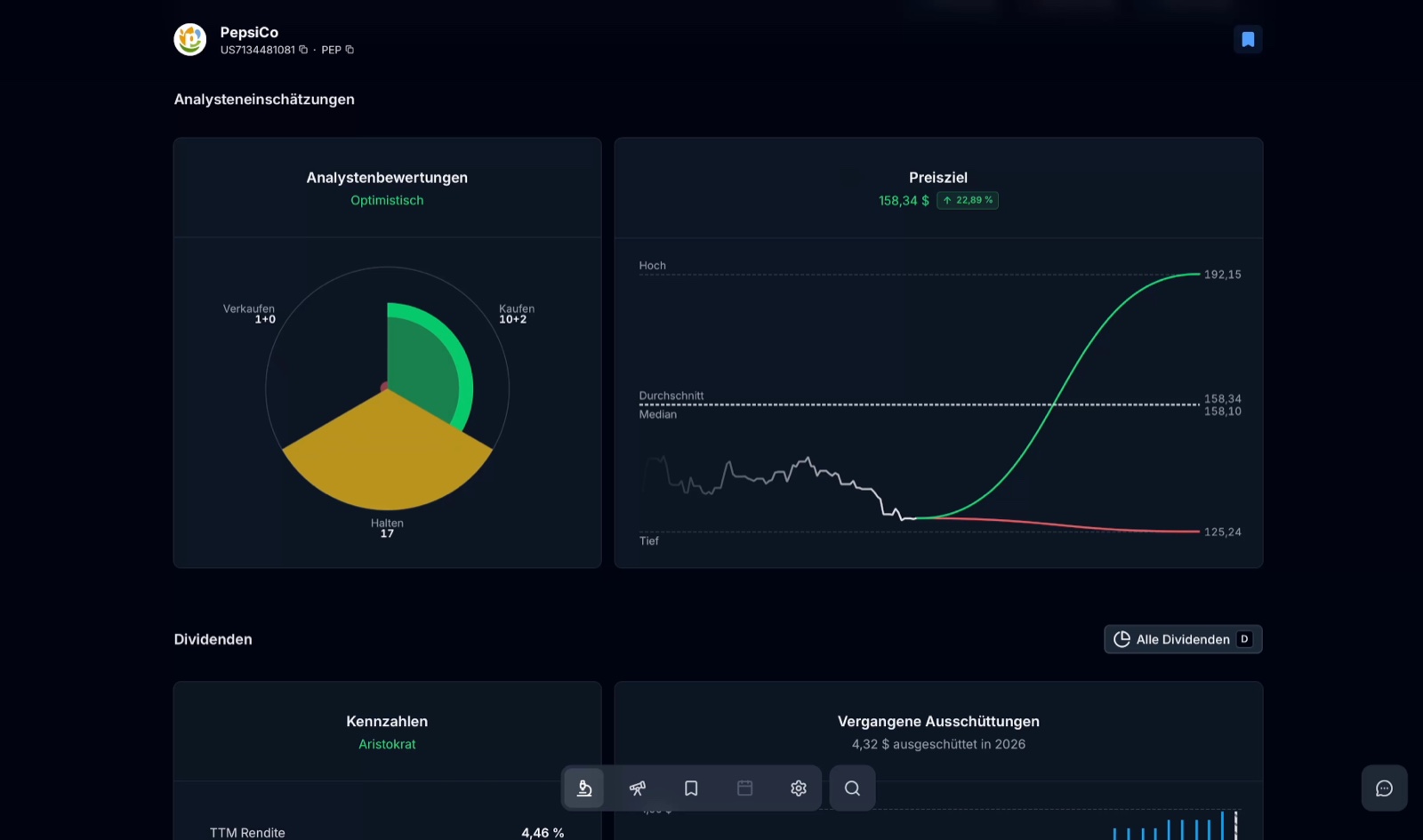
For PepsiCo the rating is "Optimistic": 10 analysts say buy, 2 strong buy, 17 hold and only one recommends selling. The average price target is $158.34 (+22.89%), with a range from $125.24 to $192.15. Below that there's the dividend dashboard (PepsiCo is flagged as an "Aristocrat", TTM yield 4.46%) and the insider trades – buys and sells by company insiders. In short: for every stock you get practically all the relevant metrics in one place.
Watchlists and portfolio import
You add interesting stocks to a watchlist with W. Via the side menu (G + B) you see your lists – and, if you use the tracker, your imported Parqet portfolios.
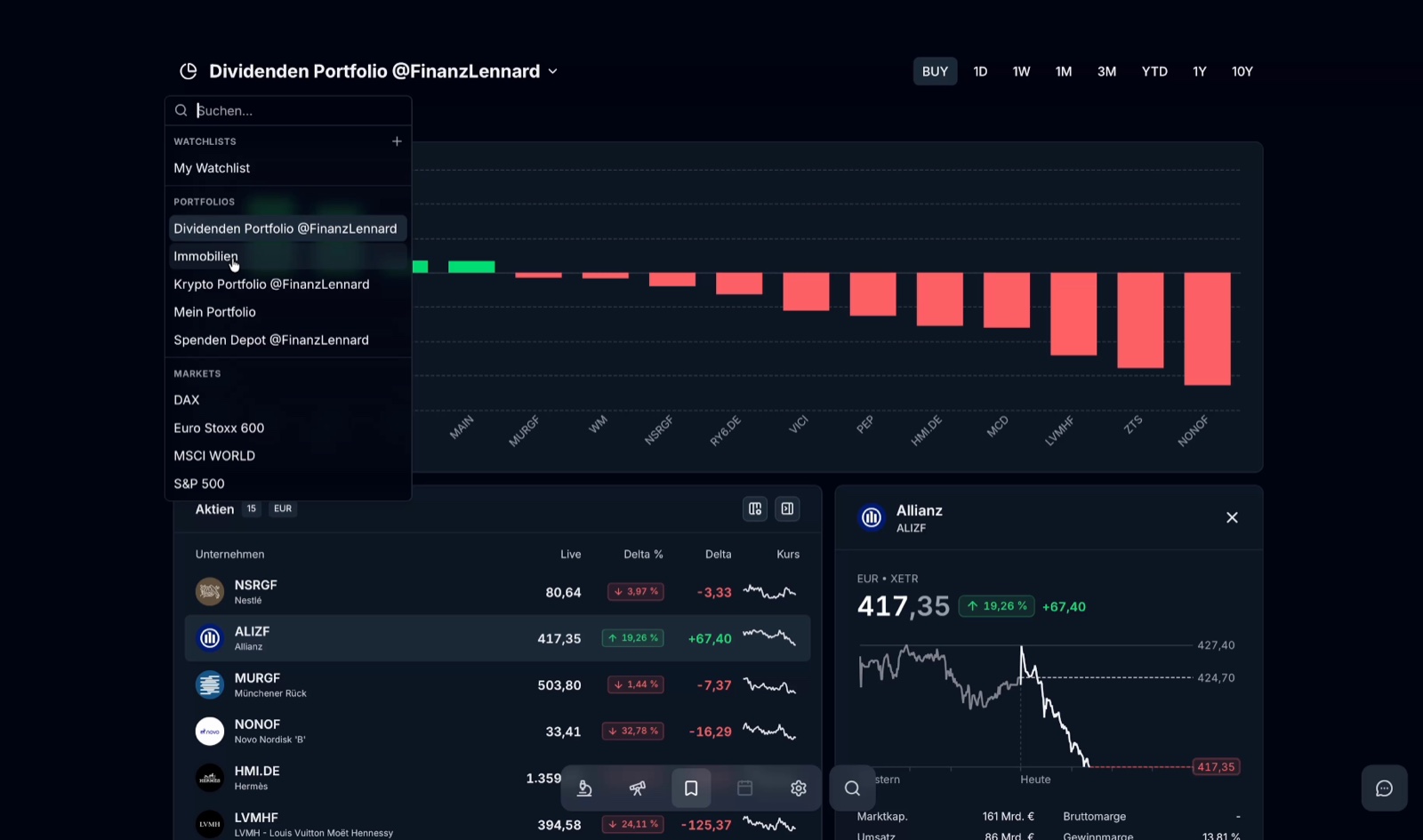
This lets me see my real portfolios – dividends, crypto, real estate, charity portfolio – right inside the research tool: allocation by country and sector, live prices, single positions and even price alerts. If you have several portfolios (say a company account or a family member's), you manage them all in one place and jump straight to a stock's analysis page from any of them.
A perfect match: the Parqet portfolio tracker (15% off)
The terminal is for analysis – but if you want to track your net worth in one place, the Parqet portfolio tracker* is the perfect counterpart. The very portfolios you import into the terminal above live there: all accounts consolidated, real returns (money- and time-weighted), a dividend forecast and a tax dashboard. I've used the tracker for years for my entire net worth – you can read my full test in the Parqet review.
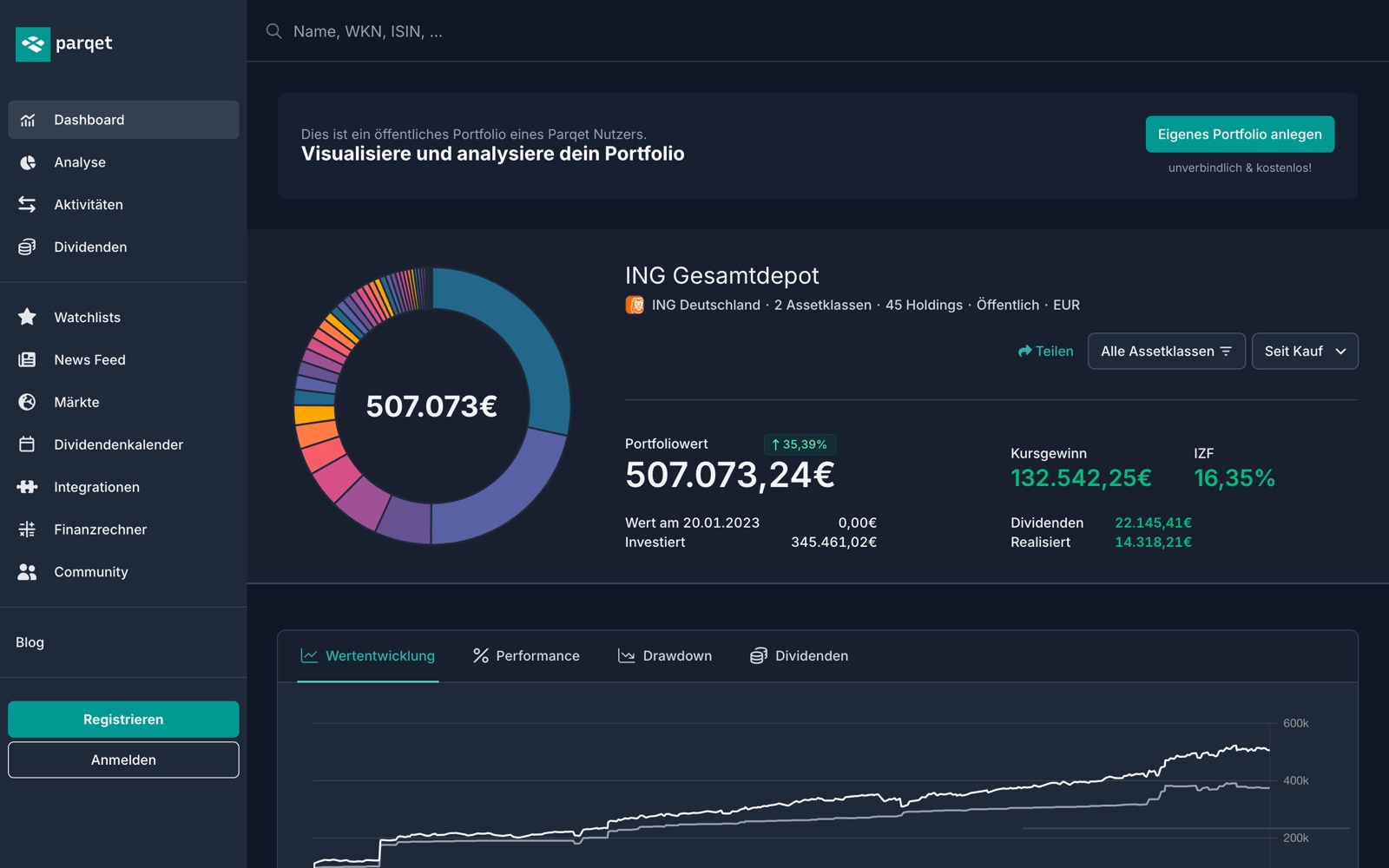
And if you want to try the tracker: with my code FINANZLENNARD you get 15% off the first year of Parqet Plus – via my link finlen.de/parqet* the discount is applied automatically at checkout. One note: this is a separate offer from the terminal – tracker and terminal are billed separately.
Settings, languages and shortcuts
Parqet Terminal is built for keyboard control – once you know the shortcuts, you're noticeably faster. In the settings (G + T) you set language, currency and colour scheme:
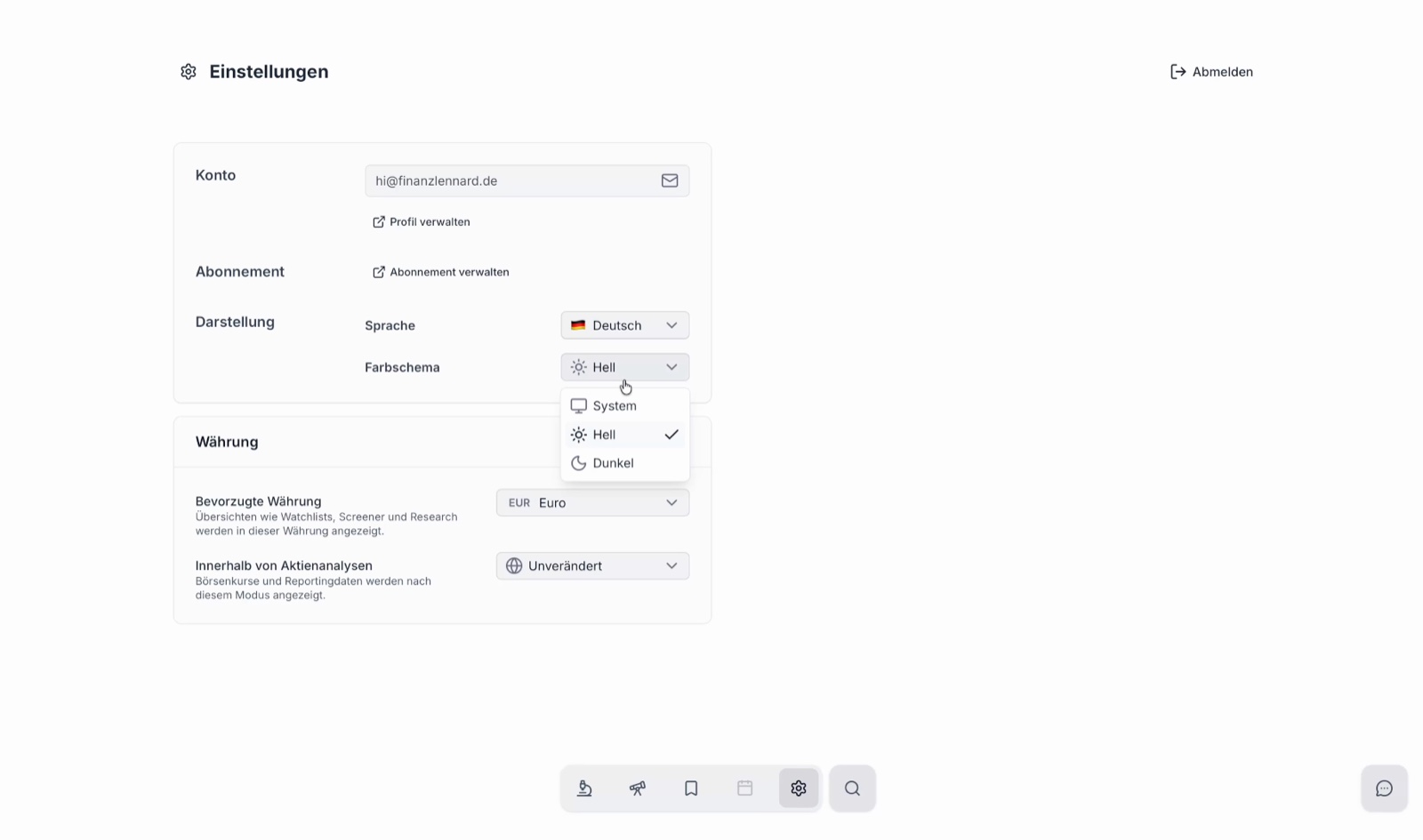
- Language: German or English
- Currency: euro, US dollar, Swiss franc or British pound – either in the stock's local currency or your preferred currency
- Colour scheme: system, light or dark
The most important shortcuts at a glance:
| Shortcut | Function |
|---|---|
| ⌘ + K | open search |
| G + R | research |
| G + S | screener |
| G + W | watchlists |
| G + T | settings |
| G + B | side menu |
| G + F | feedback & feature voting |
| F | set filters |
| / | AI search |
| M | all metrics |
| S | share screenshot |
Almost everything in the terminal can also be shared as an image – you export charts and metrics with S in 16:9, 1:1 or 9:16 formats, for social media for instance. And via G + F you can give feedback and vote on features directly – the Parqet team is known for shipping a lot of what the community asks for.
How much does Parqet Terminal cost?
On to the price. Stock analysis tools are traditionally not cheap – Parqet deliberately positions the terminal below that.
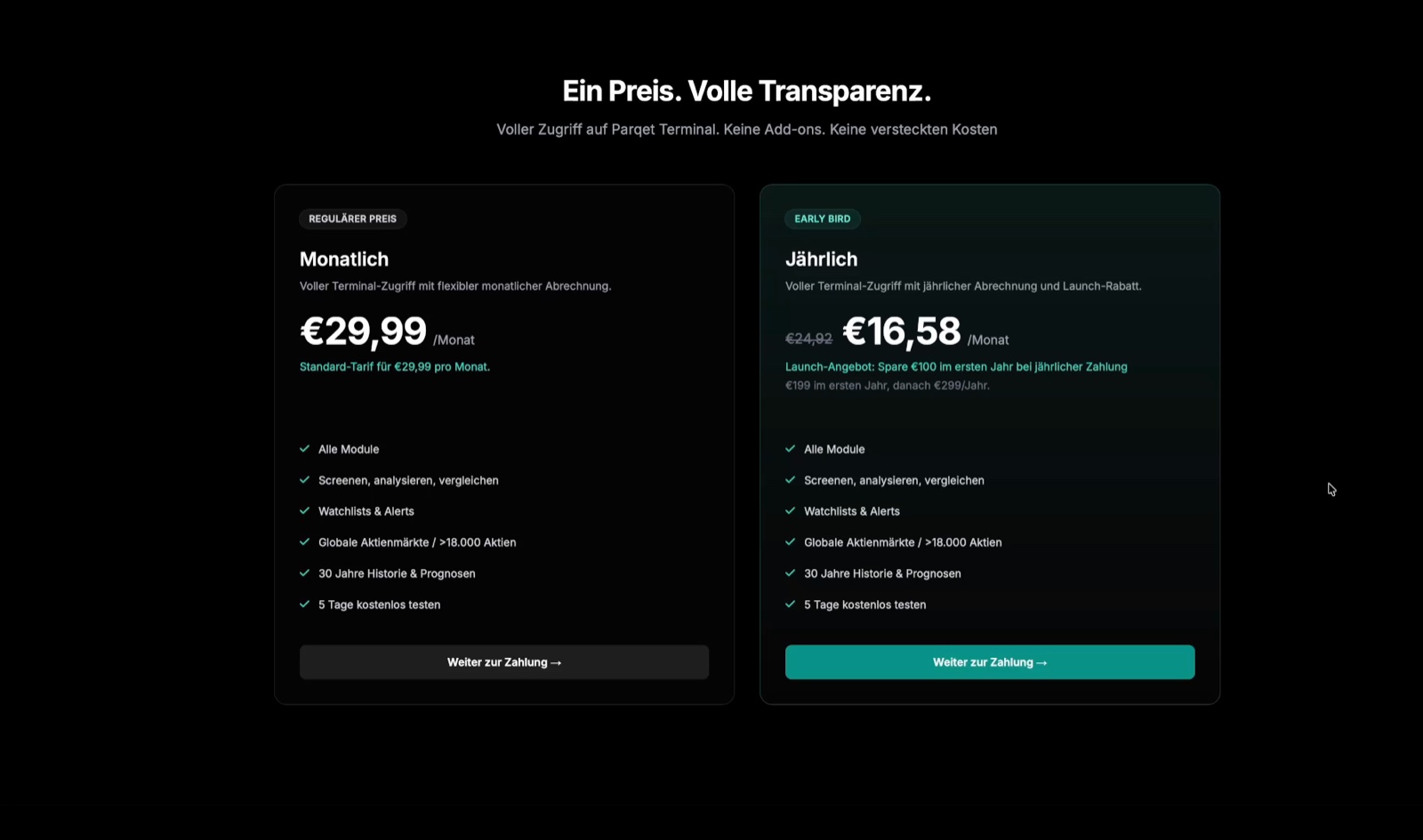
- Monthly: €29.99 per month, cancellable any time
- Annual (Early Bird): €199 the first year, then €299/year regularly – that's €16.58 per month and €100 saved in the first year
- Free trial: 5 days free, once you're unlocked from the waitlist
- Permanent free version: none (as of now)
Both plans include all modules, screener, watchlists & alerts, 18,000+ stocks, 30 years of history and forecasts – no add-ons, no hidden costs. The Early Bird offer is labelled a "launch offer"; Parqet doesn't state a fixed end date on the pricing page. At launch there was also a Founders Pass that combined the Terminal with the tracker's Investor subscription and a lifetime price guarantee – but that bundle only ran until 18 September 2026 and has already ended.
Context: what do other analysis terminals cost?
To put the price in context, it helps to look at the best-known professional tool: the Bloomberg Terminal. According to English Wikipedia it costs roughly $24,000 to $27,000 – per user, per year. Of course that's a different beast, with live data, trading and a news feed for institutions. But it shows the price bracket professional research terminals live in. Measured against that, Parqet Terminal, at around €200 to €300 a year, sits firmly at the entry-level end of analysis tools.
Who is Parqet Terminal for?
After my first intensive test, my impression is clear: this is a visually very appealing, fast tool with a surprising amount of data and features – and that just weeks after launch.
The terminal makes sense if you:
- invest in individual stocks and actively search for new ideas
- run a dividend strategy and want to filter by yield, growth and streak
- want deep metrics, peer comparisons, analyst targets and insider trades in one place
It's less interesting if you simply save into a world ETF and leave your portfolio alone – then you don't need a research terminal. That's my personal take; Parqet sees it more broadly and markets the tool "for both – simple enough for beginners, powerful enough for pros".
Who is Parqet Terminal for?
- invest in individual stocks and search systematically for new ideas
- run a dividend strategy and want to filter by yield, growth and streak
- want deep metrics, peer comparisons, analyst targets and insider trades in one place
- want to analyse your Parqet portfolios directly inside the research tool
- only save into a single world ETF and simply leave your portfolio alone
- don't analyse individual stocks and get by with your broker dashboard
- don't want to pay a monthly or annual subscription for a research tool
My verdict on Parqet Terminal
Parqet Terminal is a genuinely strong debut. The tool is fast, tidy and already ships with an enormous amount of data and functionality at launch – the screener with AI search is the highlight for me and saves real time when picking stocks. On top of that come the deep detail pages with peer comparison, analyst targets and insider trades. The fact that terminal and tracker complement each other yet still work independently is a smart design choice.
You can tell the product is only a few weeks old – two of the five modules (Markets and Compare) plus the calendar are still to come. But anyone who knows the Parqet team knows there's a steady stream of updates, and the community gets heard. For anyone who analyses individual stocks seriously, it's worth a look.
If you want to try Parqet Terminal* yourself, you can test it free for 5 days through my link and lock in the Early Bird offer.
Not investment advice, not a buy recommendation – just my personal review. All figures and metrics (e.g. for PepsiCo) are snapshots from the tool at the time of recording and serve only to demonstrate the features.
Frequently asked questions
What is Parqet Terminal?
Parqet Terminal is a standalone research tool for stock analysis from Parqet Fintech GmbH in Hamburg, Germany. It lets you find, evaluate and analyse individual stocks: institutional financial data on more than 18,000 stocks, a screener with AI search, stock detail pages with metrics, peer comparison, analyst estimates and insider trades, plus watchlists. It's a separate product alongside the well-known Parqet portfolio tracker – launched on 11 September 2026.
How much does Parqet Terminal cost?
The monthly plan is €29.99 per month. On the annual plan there's a launch Early Bird offer: €199 for the first year (equal to €16.58 per month), then €299 per year regularly – so you save €100 in the first year. There is no permanently free version, but you can test the terminal free for 5 days once you're unlocked from the waitlist. The monthly plan can be cancelled at any time.
Is Parqet Terminal the same as the Parqet app?
No. The Parqet app is a portfolio tracker – it consolidates your brokerage accounts and shows your net-worth performance. The Terminal is a pure research tool for analysing individual stocks. Both products are separate and can be used on their own. If you have both, you can import your Parqet portfolios into the Terminal and analyse them directly.
Who is Parqet Terminal for?
Mainly investors who buy individual stocks, research actively or run a dividend strategy. The screener with AI search and the deep detail pages save a lot of time when picking stocks. For pure ETF savers who buy a world ETF and leave it alone, a research terminal is barely necessary. Parqet itself positions it 'for both – simple enough for beginners, powerful enough for pros'.
How does the AI search in the screener work?
Instead of setting every filter individually, you press the slash key (/) in the screener and describe what you're looking for in plain language – for example 'German dividend stocks with at least 3% dividend yield and 10 years of dividend growth'. The terminal translates this into filters automatically and shows the matching companies. You can still combine all filters (yield, growth, market cap, profitability and so on) manually.
Which stocks and markets does Parqet Terminal cover?
Parqet cites more than 18,000 stocks; the screener shows 18,221 unfiltered and the database keeps growing. Coverage includes the US, Canada, the UK and all major European markets (Germany, Austria, Switzerland, France, Italy and more). Each company comes with up to 30 years of history and forecasts.
Is there a waitlist for Parqet Terminal?
Yes. The terminal is being rolled out gradually. According to Parqet, new users are unlocked step by step – the 5 free trial days start once it's your turn from the waitlist. If you sign up and don't get in right away, that's the reason.
Disclaimer
⚠️ Not investment advice
All content is for information and entertainment purposes only and does not constitute investment advice, a buy recommendation or an invitation to enter into a financial product. Please do your own research and make decisions based on your personal situation and risk tolerance.
📉 Risk warning & total loss
Investments in securities and other financial instruments generally carry significant risks (e.g. price, market, currency, volatility and credit risks). A total loss of the capital invested cannot be ruled out.
📊 Returns & forecasts
All performance figures, whether historical or as a forecast/estimate, are not a reliable indicator of future results. Capital and returns are not guaranteed.
🔍 Transparency & conflicts of interest
I strictly distinguish between facts and personal estimates. Important: I am often invested in the assets discussed myself, which can create a conflict of interest.
✅ DYOR (Do Your Own Research)
All information has been compiled carefully but is non-binding, without warranty and without any claim to completeness. Please inform yourself thoroughly and consider all opportunities and risks in depth before making an investment decision.
Advertising & affiliate notice
Links marked with * are advertising or affiliate links. If you sign up or buy something through such a link, I may receive a commission – at no extra cost to you. This supports my work.